In My Dog Mom Era: A Retro Review for Stitchers
As a designer who spends more time staring at stitch maps than most people spend looking at their phones, I approach every new machine embroidery design with a mix of excitement and skepticism. Trends come and go, but the "Dog Mom" sentiment feels like a permanent fixture in our craft community. When I first laid eyes on the In My Dog Mom Era Wavy Groovy Retro graphic from Smart Crafter, my initial reaction wasn't just about the cute factor; it was about potential application. This isn't just a clipart image; for us, it's a blueprint for a handmade product that needs to withstand washing, wearing, and the scrutiny of paying customers.
The Vibe Check: Retro Waves and Modern Sentiment
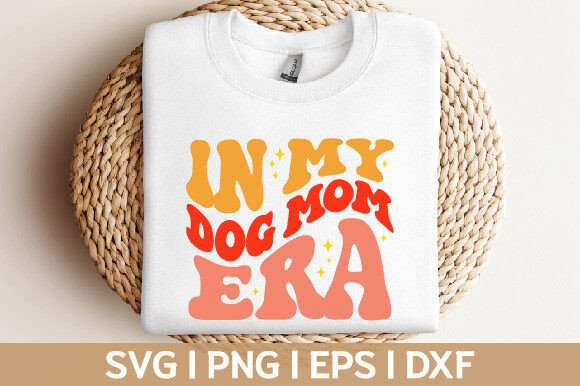
The visual personality of this piece is immediately striking. It leans heavily into the 70s revival aesthetic that has dominated social media and boutique fashion for the last few years. The wavy typography combined with the groovy layout creates a sense of movement that static block letters often lack. For an embroidery project, this fluidity is both a blessing and a challenge. The mood is playful, nostalgic, and undeniably warm. It screams "comfort" before you even touch the fabric.
From a layout perspective, the design feels balanced. The text flows naturally, suggesting that if you were to digitize this or use it as a base for an applique design, the eye would travel smoothly across the composition. However, since the product description specifies this is an SVG file compatible with cutting machines like Cricut and Silhouette, we are looking at a graphic asset that likely needs conversion or careful handling for actual stitching. If you are planning to use this for heat transfer vinyl (HTV) on a tote bag design or a sweatshirt embroidery project where the vinyl acts as the top layer, the clean lines of the SVG are perfect. If you intend to stitch it out directly, you must ensure your digitizing software can interpret those wavy edges without creating jagged running stitch paths.
Real-World Application: The Boutique Sweatshirt Scenario
Let's walk through a realistic scenario. Imagine you run a small Etsy shop specializing in personalized gifts for pet lovers. A customer orders a custom crewneck for their birthday, specifically requesting something that says "In My Dog Mom Era" but wants it to look vintage, not corporate. This is where In My Dog Mom Era Wavy Groovy Retro shines.
I would visualize this on a heather grey or oatmeal-colored fleece. The retro font pairs beautifully with textured fabrics. If you are using this as a template for a custom apparel line, the design's organic shapes help hide minor imperfections in alignment better than rigid geometric fonts. For a holiday embroidery gift or a birthday surprise, the whimsical nature of the waves adds a layer of thoughtfulness. It tells the recipient that you didn't just pick a standard font; you chose a style that matches their personality.
For those selling digital embroidery file assets or printable mockups, this graphic offers high versatility. It works exceptionally well for branding materials, such as hang tags or social media posts, reinforcing the identity of a craft business focused on pet-centric goods. The "Groovy" element makes it stand out in a crowded marketplace of generic sans-serif dog mom shirts.
Technical Considerations for Stitching and Cutting
While the aesthetic is on point, we need to talk about execution. Since this is provided as an SVG within a Zip folder, it is primarily a vector graphic intended for cutting machines. If your goal is to create an embroidered patch or direct-to-garment stitching, you cannot simply load an SVG into most embroidery machines without prior processing. You would need to import this into embroidery software to generate the necessary stitch types, such as satin stitch for the borders and fill stitch for the larger areas.
Here is where practical judgment comes in. The wavy nature of the letters means you need to be mindful of stitch density. If the curves are too tight and the density is too high, you risk puckering, especially on stretchy fabrics like t-shirts or baby clothes. Conversely, if the density is too low, the "groovy" feel might get lost, and the text could become illegible from a distance.
When working with this design on dark fabric, contrast is king. A light thread color against a navy or black background will make the retro waves pop, but you must ensure your underlay stitches are sufficient to prevent the dark fabric from showing through the lighter threads. For textured fabrics like towels or canvas tote bags, a higher density might be necessary to cover the weave of the material, but always test on scrap fabric first.
Navigating Tricky Surfaces and Materials
Not every surface is created equal. If you are considering this for a cap or hat, remember that curved surfaces distort designs. The horizontal flow of the wavy text might look uneven if not centered perfectly on the front panel of a cap. Similarly, for baby embroidery projects, softness is paramount. Avoid dense stitching on items that will be against sensitive skin. In these cases, using the SVG to cut a soft flex-vinyl and pressing it onto the garment might yield a softer hand-feel than heavy machine stitching.
Small details matter. The tails of the letters and the ends of the waves are potential weak points. In a commercial setting, these tiny corners can fray after frequent washing if not properly tacked down or if the stitch direction fights the grain of the fabric. Always inspect small details in your preview mode before hitting start.
Maximizing Value and Professionalism
Using a high-quality graphic like In My Dog Mom Era Wavy Groovy Retro elevates the perceived value of your finished product. Customers are willing to pay more for items that look professionally curated rather than slapped together. The cohesive retro theme helps with brand consistency if you are building a collection around vintage pet aesthetics.
For the Etsy seller or creative entrepreneur, trust is built on presentation. A design that looks crisp in a printable mockup and translates well to the physical item reduces returns and increases positive reviews. Whether you are making a kitchen towel, a pillow cover, or a boutique shirt, the clarity of the design ensures that the message lands effectively.
Final Designer Notes and Best Practices
Before you commit to a production run or a client order, keep these practical steps in mind:
- Verify Compatibility: Confirm that the SVG file opens correctly in your specific software (Cricut, Silhouette, Brother Scan N Cut, etc.).
- Test First: Always stitch or cut a sample on scrap fabric that matches your final material to check for tension and registration.
- Check Licensing: Since this is a digital asset from Smart Crafter, review the license terms carefully. Ensure you are allowed to use it for commercial projects if you plan to sell the physical items.
- Stabilizer Selection: Match your stabilizer to the fabric weight. Stretchy knits need cut-away stabilizer, while woven cottons often do well with tear-away.
- Color Contrast: Test the design in black and white mockups to ensure the shape holds up without relying solely on color differences.
In the world of Crafts and Graphics, finding a design that balances trendiness with technical feasibility is rare. In My Dog Mom Era Wavy Groovy Retro offers a solid foundation for creators who want to tap into the pet lover market with style. With the right preparation and attention to detail, this design can be the centerpiece of a profitable and beloved product line.